Most videos uploaded every day never reach the audiences they deserve because creators skip essential optimization steps. This article shows practical, actionable video SEO tips to help your videos rank better in search, keep viewers watching longer, and drive measurable traffic to your pages.
Video SEO isn’t optional—search engines and platforms prioritize rich media, and platforms like YouTube report over 2 billion logged-in monthly users (source: YouTube Official Blog). Follow the steps here to make sure your video content is discoverable, clickable, and keeps users engaged across search results and platform feeds.
This guide focuses on practical techniques you can implement now: from keyword-driven titles and descriptions to thumbnails, transcripts, and structured data that help search engines understand and surface your videos.
Introduction to Video SEO
Search algorithms increasingly reward rich media, and video content gives you more surfaces in search results to capture attention. This section explains why videos matter for visibility and how you can use targeted optimization to get more traffic to your pages.
Understanding the Importance of Video in Digital Marketing
Video content drives engagement signals that search engines and platforms notice: longer session durations, higher time-on-page, and more social shares. These behavioral signals help search engines understand that your page delivers useful information, which can improve its placement in search results (see Backlinko’s CTR research for how SERP position affects clicks: https://backlinko.com/search-engine-optimization).
Rather than treating videos as an add-on, design them to answer a specific query and move viewers toward a next action on your site—this is the most effective way to convert views into measurable outcomes.
How Video Influences Search Engine Rankings
Google and other search engines surface video across multiple features: the main organic results, a dedicated video tab, and discovery-style feeds. Thumbnails and rich snippets take up extra real estate in the SERP, increasing the chance that people click your result.
Thumbnails boost CTR—studies show visual results typically attract higher click-through than plain text listings (see industry analyses such as Backlinko). Use a descriptive title and strong thumbnail to increase the likelihood your video appears and gets clicked in search results.
Platform-specific optimization matters: YouTube is responsible for a large share of surfaced video in search, so optimizing for YouTube and for your own site simultaneously widens your reach.
Instead of an internal comparison table here, convert the original metric comparisons into concise bullets to keep clarity without adding another table:
- Average session duration: video pages tend to keep users on-site longer than text-only pages (source: industry engagement analyses).
- Bounce rate: well-produced video content commonly correlates with lower bounce rates when paired with relevant on-page copy.
- Click-through rate: listings with thumbnails and accurate titles show higher CTR versus plain text snippets.
- Social sharing: video assets are more likely to be shared on social media, expanding organic reach.
These benefits compound: a video that ranks in search not only drives direct views but can increase overall page authority and referral traffic from social platforms.
Fundamentals of Video SEO Best Practices
Even well-produced videos can remain invisible without correct technical setup. This section covers the on-page and metadata elements search engines expect so your video content can be discovered, indexed, and shown in search results.
Key Technical Requirements for Indexing Videos
Search engines find videos when they are embedded with standard, crawlable elements such as <video>, <iframe>, or <object>. Host media on stable URLs (no data URLs or short-lived CDN links) so crawlers can fetch the file and its thumbnail reliably.
Your watch page must also be a well-optimized page: unique title, meaningful description, and crawlable HTML so the page ranks independently — that page-level performance influences whether the embedded video earns enhanced search features (source: Google Developers — Video best practices).
- Use <video> when self-hosting; use <iframe> for embeds (YouTube/Vimeo) that expose a public, crawlable watch URL.
- Avoid fragment identifiers and data URLs for primary video delivery; they prevent consistent crawling.
- Provide a persistent thumbnail URL and include it in structured data.
Formats, File Names, and Other Practical Details
Choose broadly supported formats (MP4 and WebM are safe choices) and name files with descriptive keywords (for example: topic-primary-keyword-2026.mp4). Clear filenames and accessible formats give search engines preliminary context before they parse structured data and transcripts.
Compression matters: balance visual quality and file size to avoid slowing page load. Slow pages harm user experience and can reduce the chance your page ranks well in search results.
Structured Data and Video Sitemaps Essentials
Structured data and a video sitemap tell search engines exactly what your content is and where to fetch it. Implement VideoObject JSON-LD and list watch pages with <video:video> entries in an XML sitemap to increase indexing reliability (source: Google Developers — Video structured data).
Example (simplified) VideoObject JSON-LD to adapt for each watch page:
{
“@context”: “https://schema.org”,
“@type”: “VideoObject”,
“name”: “Your video title with primary keyword”,
“description”: “Short description that includes target keywords”,
“thumbnailUrl”: “https://example.com/thumbnail.jpg”,
“uploadDate”: “2026-01-01”,
“contentUrl”: “https://example.com/video.mp4”,
“embedUrl”: “
“,
“duration”: “PT2M30S”
}
Keep metadata consistent across your page content, XML sitemap, and structured data. Conflicting information (different titles, dates, or thumbnail URLs) can confuse crawlers and reduce your chance of earning enhanced search features.
Fact: Google documents that properly implemented video structured data can enable rich results like key moments and video previews (see Google Developers: Video structured data).
Follow these technical best practices to make sure search engines can find and understand your videos; once crawled, the other optimizations in this guide improve the likelihood those videos rank and appear in video search results.
Understanding the Impact of Video Content on SEO
Focusing on raw view counts misses what platforms actually reward: deeper engagement signals that show people are finding value. This section explains which viewer behaviors matter for search and how to design video content that improves those signals.
Increased User Engagement and Watch Time
Audience retention and total watch time are two of the strongest behavioral signals platforms use to evaluate video relevance. YouTube specifically highlights watch time and viewer retention as important ranking considerations in many help articles and creator resources (see YouTube Help on retention and watch time).
Retention beats vanity views: for example, a video with 1,000 views and 70–80% average retention will generally perform better in suggested and search placements than a 10,000-view clip with 20% retention, because algorithms prefer content that keeps people engaged and on the platform longer (source: YouTube Creator resources).
The first 10–20 seconds are critical for retention—hook quickly with a clear value proposition or the most interesting visual moment to reduce early drop-off. Session watch time (the length a user stays on the platform after watching your video) also matters because it signals whether your content leads to additional engagement.
Brand Visibility and Trust Building
Video-rich search results—thumbnails, video snippets, and key moments—occupy more visual space in the SERP and tend to get higher click-through rates than plain text results (see industry analyses on SERP CTR). Use accurate titles, clear thumbnails, and structured metadata to earn those placements.
Visual content builds trust faster: people infer expertise from production quality, on-screen demonstrations, and speaker credibility. That trust often translates into longer page sessions and higher conversion rates when you route viewers from the video to a relevant page on your site.
Practical takeaway: design your video to answer a clear user query, optimize the opening 15–20 seconds to retain viewers, and align on-page content so search engines and users see consistent, useful information across the video and its watch page.
Keyword Research for Video SEO Success
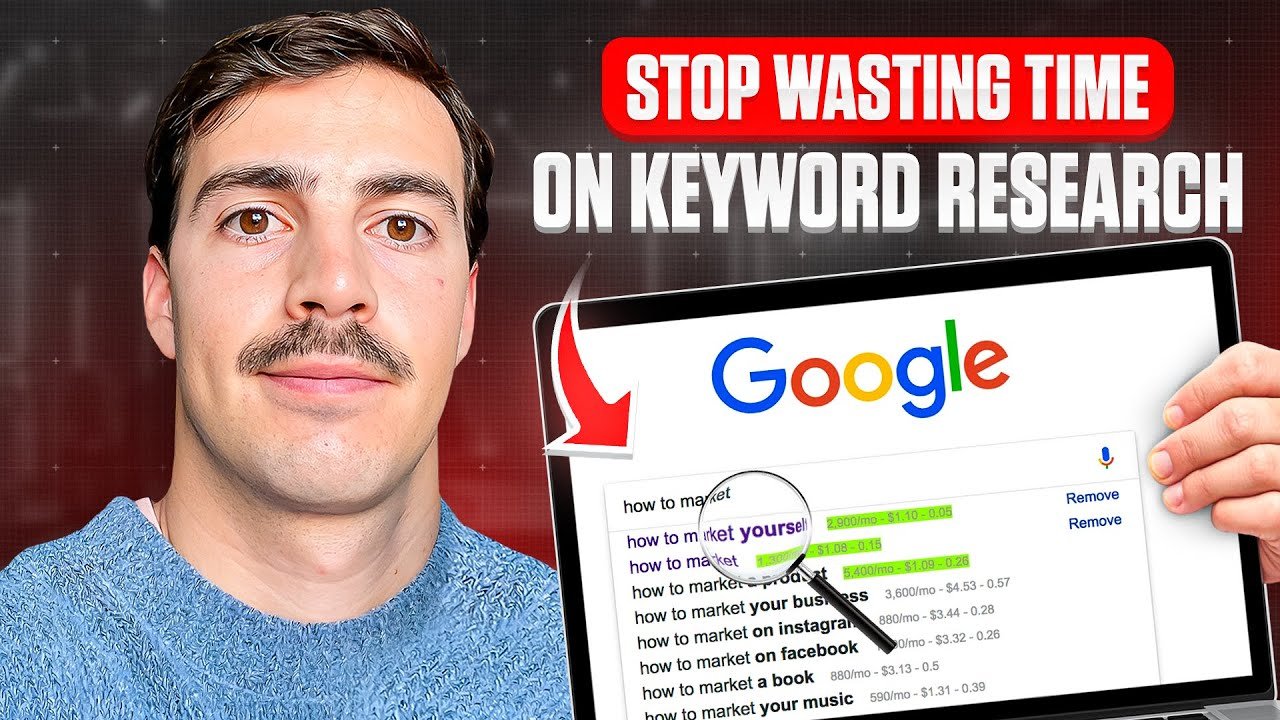
Keyword research for videos follows different rules than for long-form text. Prioritize queries where video already appears in search results and where users expect visual answers—that gives you the best chance to rank and earn meaningful watch time.
Targeting queries without existing video results usually wastes effort. Instead, find terms with visible video placements in Google Search or YouTube and optimize your asset to match that intent.
Utilizing Tools and YouTube Suggest
YouTube Suggest (the autocomplete dropdown) shows real user phrasing and is a free way to surface long-tail keyword variations. Type a seed term and note the most relevant suggestions; they reflect common search behavior on the platform.
For deeper metrics, tools like VidIQ provide search volume estimates and competition indicators—useful for prioritizing ideas. Note: VidIQ’s free tier limits historical data and some volume accuracy, so treat estimates as directional rather than exact (see VidIQ docs).
Analyzing Competitor Keywords and Trends
TubeBuddy exposes competitor tags and some ranking signals, while YTCockpit aggregates engagement benchmarks and average length for top-ranking videos. These tools reveal where competitors are weak—an opportunity to create a better-optimized video that fills the gap.
Example workflow (quick wins):
- Type your seed keyword into YouTube; capture 8–10 YouTube Suggest results.
- Check the top 3 ranking videos for that query; note title phrasing, thumbnail style, and video length.
- Use VidIQ or TubeBuddy to estimate search volume and tag strategies; prioritize terms with moderate volume and low competition.
- Check your YouTube Studio > Traffic sources > YouTube search to see queries you already rank for—optimize those videos first for faster gains (source: YouTube Studio documentation).
Tool comparison notes: if you need to pick one research tool as the primary choice, VidIQ is often the best for keyword discovery and search volume context; TubeBuddy is strong for tag and meta workflows; YTCockpit provides competitive benchmarking. Clear winner for initial keyword discovery: VidIQ for its breadth of keyword data (with the caveat about free-tier limits).
Finally, capture keywords naturally in your video title, the first 125 characters of the description, and in on-page copy for the watch page—this alignment helps both search engines and users understand the content immediately.
Optimizing Video Titles, Descriptions, and Tags
Your title needs to do two jobs: signal relevance to search engines and prompt a human to click. Treat title, description, and tags as a single system—when they align around a clear keyword and user intent, your videos have a much better chance to appear in search results and suggested feeds.
Crafting Click-Worthy Titles with Target Keywords
Front-load your primary keyword within the first 50–60 characters so it’s visible in most search results and on mobile. Use this pattern: Primary keyword — compelling hook (example: “video seo tips — 5 quick fixes to boost rankings”). Avoid clickbait that misleads viewers; misleading titles increase early drop-off and hurt retention.
Good title example: “how to optimize videos for google search — step-by-step” Bad title example: “You Won’t Believe This Video Trick!”
Best Practices for Detailed Video Descriptions
Write a 200+ word description that clearly explains what the video covers and includes related keywords naturally. Put the most important info and a call to action in the first 125 characters—this snippet is what many viewers see in search and influences click decisions.
Suggested structure for a 200+ word description:
- First 1–2 lines (≤125 characters): concise value proposition + CTA (link to watch page or timestamp)
- Next 2–3 short paragraphs: what viewers will learn, target keywords woven in, and any important product or resource links
- Final section: chapter timestamps, social links, and a short transcript excerpt if relevant
Paste the full transcript on the watch page and/or upload captions to the platform so search engines and internal search can index the spoken content.
Tags, Keywords, and Audio Mentions
Tags still help with topical signals—use roughly 4–8 focused tags: one primary keyword, two variations (phrasing and synonyms), and 1–2 topical tags. Don’t stuff tags; keep them relevant so the platform categorizes your content correctly.
Mention your target keyword naturally in the spoken audio once or twice near the start and again later to help automatic speech recognition match text indexes. Upload a full transcript for accuracy.
[ADD YOUR EXPERIENCE HERE]Creating Eye-Catching Thumbnails for Better CTR
In feeds where people decide in a split second, your thumbnail is the visual hook that determines whether someone stops scrolling. Treat thumbnails as a short ad for the video: clear subject, strong contrast, and a simple message that matches the title and page content.

Designing Custom Thumbnails That Stand Out
Auto-generated frames usually underperform. Custom thumbnails let you control composition, facial expressions, and color contrast to communicate intent instantly. YouTube recommends 1280×720 (minimum width 640) and keeping file size under 2MB—use JPEG, PNG, or WebP for best compatibility (source: YouTube Help).
Also make sure thumbnail URLs are stable; short-lived CDN links can prevent crawlers from fetching the image and disqualify enhanced results.
Incorporating Text Overlays to Boost Clicks
Use concise text overlays (3–5 words) that summarize the value proposition—avoid long sentences. Place text where it won’t be obscured by the platform UI on mobile. Keep one bold visual element and a clear focal point so the thumbnail still reads at small sizes.
A/B test thumbnails when possible: swap two designs for several days and compare CTR and average view duration. Practical test: run each variant for 7–14 days and measure change in CTR and retention to identify the best-performing design.
Enhancing Accessibility with Transcriptions & Captions
Captions and transcripts are one of the highest-ROI technical optimizations for video SEO. They provide indexable text, improve accessibility for people with hearing loss or non-native speakers, and increase watch time when viewers can follow without sound.
Improving SEO Through Video Transcriptions
Full transcripts give search engines exact, crawlable text that describes your video content. Publish the transcript on the watch page and include it in structured data where possible so search engines can match spoken content to queries (source: Google Search Central).
Services like Verbit’s transcription solutions can speed accurate captioning, but auto-captions should be reviewed for errors before publishing.
Benefits of Closed Captions for Diverse Audiences
Closed captions expand reach to hearing-impaired users, non-native speakers, and viewers in quiet environments. Better accessibility often leads to higher retention and improved engagement metrics that search engines track.
| Feature | Primary Benefit | Secondary Advantage | Impact Level | |||
| Full Transcripts | Complete text indexing | Internal search & repurposing | High |
| Closed Captions | Accessibility compliance | Higher retention | Medium-High |
| Both Combined | Maximum audience reach | Better engagement signals | Very High |
Best Practices for Video File Names and Formats
Optimization starts before upload: filename, format, and compression affect indexing and page performance. Name files descriptively (example: topic-primary-keyword-2026-03-01.mp4) and keep consistent naming conventions across your library.

Optimizing File Names with Relevant Keywords
Search engines use filenames as a minor contextual signal—use hyphens, include the primary keyword, and avoid generic names like “final_v3.mp4”. This small step helps crawlers and humans understand the file before parsing structured data or transcripts.
Choosing the Right Video Formats for Web Compatibility
Stick to widely supported formats such as MP4 (H.264) and WebM for both compatibility and compression efficiency. Avoid data URLs for primary delivery; serve media from crawlable, persistent URLs so search engines can access content reliably (source: Google Developers).
Balance compression and quality—oversized files slow page load and hurt mobile experience. Test video playback across desktop and mobile to ensure codecs and containers work as expected.
Embedding Videos on Your Website for Improved SEO
Embedding videos on your own site creates a durable pathway from search results to your content and helps you retain people on pages you control. Dedicated watch pages with clear metadata make it easier for search engines to index your videos and for users to find the information they need.
Creating Dedicated Watch Pages and Video Sitemaps
Build one watch page per video with a unique, optimized title and description that match the video’s intent. Include the video embed, a full transcript, chapter timestamps, and related links so the page is useful even if someone doesn’t watch the entire clip.
Use a video sitemap (video:video entries in XML) to list watch pages and media file URLs; this explicit roadmap increases the chance search engines will crawl and index your library (source: Google Search Central).
Boosting Site Engagement with Embedded Content
Embedded videos often increase dwell time and lower bounce rates when the surrounding page provides context and next steps. Link to related articles, playlists, or products with clear end-screen CTAs to extend session duration and guide visitors through your site.
Note the trade-off: hosting files yourself gives you control but increases bandwidth and page-load responsibility; hosting on YouTube offloads bandwidth but can reduce direct traffic to your site. Consider a hybrid approach—host the canonical video on YouTube for reach and keep an optimized watch page on your site for SEO and conversions.
Leveraging Social Media and Backlinks for Video Promotion
Promotion outside of search amplifies signals that search engines interpret as relevance. Share strategically on social platforms and pursue backlinks from authoritative blogs to increase referral traffic and perceived authority.

Sharing Strategies for Maximum Social Reach
Each platform has strengths and limits—tailor your approach:
- LinkedIn: Best for B2B and longer-form explanations (3–5 minutes); weaker for viral short-form entertainment.
- TikTok: Short, attention-grabbing clips (15–60 seconds) perform well; prioritize trends and native editing for reach.
- Facebook: Broad demographic reach; useful for community discussion and reposting full-length clips or highlights.
- Instagram: Visual-first—use short reels or trimmed clips with strong visuals and captions.
Quick checklist for sharing: craft platform-specific captions, include a link to the watch page, add subtitles for silent autoplay, and schedule posts to match peak audience hours.
Building High-Quality Backlinks to Increase Authority
Backlinks from niche, authoritative blogs and industry sites act as endorsements. Guest posts with embedded watch pages or resource round-ups that naturally include your video drive both referral traffic and relevance signals.
Use a simple outreach template: briefly explain why the video adds value to their audience, suggest an embed or quote, and offer exclusive data or a short interview to sweeten the pitch. Prioritize relevance over quantity—topical links carry more weight than many unrelated mentions.
| Platform | Primary Audience | Optimal Clip Length | Best Use | |||
| Professionals | 3–5 minutes | Thought leadership, explainers | |
| TikTok | Gen Z / Millennials | 15–60 seconds | Trends, short how-tos |
| Broad demographic | 2–4 minutes | Community & long-form highlights | |
| Visual-first users | 15–90 seconds | Reels, product visuals |
Fact-based note: tailor content and distribution to where your audience already spends time—this alignment produces better engagement and more meaningful backlinks that support search rankings.
Analyzing Video Performance with Analytics Tools
Good optimization is iterative: analytics tell you which changes improve discoverability, watch time, and conversions. Use platform data to identify weak spots (low retention, poor CTR) and prioritize fixes that move the key metrics for your page and channel.
Utilizing YouTube Analytics for Viewer Insights
YouTube Analytics shows granular signals such as watch time distribution, audience retention, and traffic sources. Use the retention graph to find the exact second viewers drop off and the Traffic source report to separate search-driven views from suggested and external referrals (source: YouTube Help).
Actionable checks: compare average view duration and relative retention across videos, then test one variable at a time (title, thumbnail, intro) to see which change lifts retention or CTR.
Monitoring Metrics with Google Search Console
Google Search Console’s Video indexing report and Performance report (filter by Videos) reveal which watch pages are indexed and how they perform in Google Search. The Video indexing report will flag technical issues such as missing structured data or inaccessible thumbnails; use those diagnostics to fix crawl failures quickly (source: Google Search Central).
Small on-page fixes—adding structured data, correcting thumbnail URLs, or improving the page title—can often yield faster search results than producing new videos.
Advanced Techniques and Structured Data for Video SEO
Structured data unlocks enhanced search features (key moments, video previews, clip markup) that increase visibility in search results. Implement these carefully and make sure timestamps and labels match your transcript to avoid markup errors.
Implementing Key Moments and Video Previews
Key moments (clip markup) let you mark chapters that appear as labeled timestamps in search results, improving user experience by sending viewers to the most relevant segment. Google documents support for clip and keyMoment markup—use the VideoObject schema and include an array of timestamps with clear labels (source: Google Developers).
Sample (simplified) addition to VideoObject for key moments:
{
“@context”: “https://schema.org”,
“@type”: “VideoObject”,
“name”: “Video title”,
“description”: “Short description”,
“thumbnailUrl”: “https://example.com/thumb.jpg”,
“uploadDate”: “2026-01-01”,
“duration”: “PT3M20S”,
“clip”: [
{
“@type”: “Clip”,
“name”: “Intro”,
“startOffset”: 0,
“endOffset”: 30
},
{
“@type”: “Clip”,
“name”: “How to optimize titles”,
“startOffset”: 30,
“endOffset”: 90
}
]
}
Limitations: creating accurate key moments manually is time-consuming and previews only work when Google can fetch stable media and thumbnail URLs. Expect implementation overhead for large libraries.
Enhanced Markup for Better Search Engine Visibility
BroadcastEvent and Live Badge markup help streaming content surface to the right audience, while regionsAllowed can restrict where a video appears for licensing reasons. Use these only when they match your distribution goals; incorrect markup can cause indexing errors.
Fact: Google supports clip and key moment markup in Video structured data; consult Google Developers for exact fields and validation steps (https://developers.google.com/search/docs/appearance/structured-data/video).
Expert Video SEO Tips for Maximum Visibility
Treat optimization as an ongoing cycle: make a change, measure impact, and iterate. Use controlled experiments (A/B tests) where possible and compare CTR, average view duration, and impressions before and after the change.
Actionable Strategies to Optimize Video Content
Examples of micro-tests: swap thumbnails for 7–14 days and compare CTR and retention; change the front-loaded title wording and measure impressions and click rate; add a transcript and monitor any lift in search impressions. Use a control group (an unmodified video) to isolate the effect of your change.
Community management matters: ask specific questions in the video to prompt substantive comments, and respond within the first 24 hours to build early engagement signals that platforms reward.
Measuring Impact and Iterating for Continuous Improvement
Track at the page level so you can attribute traffic and conversions to video optimizations. For self-hosted content, placing the video and its transcript near the top of the watch page often signals primary content, but balance that with page speed and layout stability to avoid harming Core Web Vitals.
Regular cadence: review analytics weekly for high-traffic pieces and monthly for the broader library. Prioritize fixes that move the needle on watch time and search impressions first—those changes tend to compound across your channel and site.
Conclusion
Invest in systematic video SEO: combine correct file formats and structured data with titles, thumbnails, and transcripts that answer real user queries. Use data to iterate—small fixes to metadata or thumbnails often produce faster gains than creating new videos. Recommendation: prioritize indexing fixes, title/thumbnail tests, and transcript uploads on your top 10 pages first to maximize short-term impact.