
Choosing the right tool to construct your website is a critical business decision. It affects your site’s speed, your team’s workflow, and your project’s final cost. Two giants dominate this space, powering a combined total of over 11 million websites worldwide.
On one side, you have the market leader with 9.3 million active installations. On the other, a formidable contender with 1.9 million. But raw popularity is a poor proxy for actual performance.
We moved beyond the marketing claims. Our team conducted rigorous, real-world testing on everything from simple landing pages to complex layouts. This comparison delivers the concrete data you need, not another opinion piece.
The final choice hinges on a few concrete factors: raw loading speed, intuitive interface design, comprehensive feature sets, and genuine value for your specific use case. Let’s cut through the noise.
Key Takeaways
- Together, these two page builders are the foundation for over 11 million active websites.
- Market share numbers do not automatically translate to better speed or a superior user experience.
- Independent, hands-on testing is essential to uncover true performance differences.
- Your selection directly impacts critical metrics like site speed, design freedom, and long-term expenses.
- Our analysis provides evidence-based recommendations, prioritizing your results over brand hype.
- The optimal builder for you depends entirely on your project’s unique scope and requirements.
- Evaluate both the interface design and the depth of features before making a commitment.
Introduction and Overview
Your website’s performance and design flexibility are directly tied to the core builder you implement. We are examining two distinct architectural philosophies for WordPress.
One functions as a standalone plugin compatible with any theme. The other is an integrated theme and visual editor framework. This fundamental difference shapes every aspect of the user experience.
The business models are equally divergent. A generous freemium plan offers over 30 widgets at no cost. The alternative requires an upfront payment but delivers a complete, unlimited package without tiered restrictions.
Our testing protocol was exhaustive. We measured raw speed, ease of use, styling depth, and advanced features like eCommerce and AI tools.
Both platforms provide drag-and-drop editing. Their underlying workflows, however, reflect completely different design philosophies. Understanding this core distinction is crucial.
It allows you to evaluate which system aligns with your operational preferences and project requirements. We focus on measurable outcomes, not marketing claims.
Exploring Elementor: Features and Performance
Our testing protocol focused on three distinct page complexity levels to gauge real performance. We moved from basic layouts to intricate designs with dynamic content.
Key Widgets and Interface
The platform’s fixed sidebar interface houses its core widgets. This layout provides direct access to elements for building a website.
Users can drag and drop from a wide library. This includes advanced modules and pre-made templates.
Performance Metrics and Testing Results
Data reveals clear trends. Basic pages scored 84 on desktop and 75 on mobile in PageSpeed Insights.
Standard complexity pages maintained decent scores with smaller file sizes. The real story is with complex layouts.
Here, Elementor outperformed Divi significantly. It handled intricate designs with much stronger metrics.
| Metric | Basic Page | Standard Page | Complex Page |
|---|---|---|---|
| PSI Desktop Score | 84 | 80 | 82 |
| PSI Mobile Score | 75 | 70 | 79 |
| Page Size | ~500 KB | ~550 KB | 575.4 KB |
| Load Time | ~700 ms | ~750 ms | 718 ms |
| First Contentful Paint | 2.7s | 3.0s | 2.7s |
| Largest Contentful Paint | 4.7s | 5.0s | 4.7s |
For average use cases, this builder provides sufficient performance. Power users chasing maximum speed may consider specialized alternatives.
Exploring Divi: Features and Performance
With Divi, you’re buying into a complete framework, not just a page editor. It combines a powerful theme with a visual builder into one integrated system.
This holistic approach defines every aspect of the platform. You get unlimited site licenses and a straightforward pricing model.
Lifetime Options and Unique Design Approach
The Divi builder operates on an everything-included principle. There is no free version, but there are also no tiered restrictions.
Divi offers 68 core modules for content, WooCommerce, and structure. You access them all immediately.
Its interface uses floating panels, not a fixed sidebar. This gives you full-screen design flexibility with movable settings.
The theme and builder work as one. This creates a unified workflow for constructing any page.
For rapid building, you get over 350 Layout Packs. These contain more than 2,500 individual templates.
Pricing starts at $89 yearly for unlimited sites. A one-time $249 lifetime payment is also available. This makes the builder highly attractive for long-term projects.
The system structures content with Sections, Rows, and modules. It’s a different, yet equally capable, paradigm.
You build a page from a vast library of pre-made templates. The Divi builder provides a complete toolkit from the start.
Elementor vs Divi: Head-to-Head Performance Comparison
Performance isn’t a single score; it’s a story that changes with your page’s design. We ran comprehensive tests across three complexity levels to eliminate guesswork.
On basic layouts, Divi takes a narrow lead. It delivers better frontend speeds with far fewer server hits—just 14 HTTP requests versus 33. Its built-in CSS and JavaScript optimization is a key feature Elementor lacks.
This efficiency results in a faster load time and a superior mobile score of 87.
For standard page complexity, Divi maintains a marginal performance advantage. It continues to load slightly faster with optimized code delivery.
The narrative flips dramatically with complex designs. Here, Elementor delivers much stronger metrics while Divi’s scores drop to problematic levels. Interactive elements particularly strain the latter builder.
| Page Complexity | Performance Leader | Key Advantage |
|---|---|---|
| Basic | Divi | Fewer HTTP requests, faster load (696 ms) |
| Standard | Divi | Marginally improved loading speeds |
| Complex | Elementor | Superior scores on interactive elements |
Divi’s test page size was larger at 783.4 KB. Yet, its optimized delivery often means faster actual loads on simpler websites.
Neither builder matches the raw speed of modern alternatives. For average use cases, both handle the job if you understand this comparison.
Backend and Frontend Experience
The true test of a page builder lies not in its marketing, but in how it performs for both the creator and the visitor. We measure two distinct realms: backend editor fluidity and frontend page delivery.
Editor Responsiveness
Backend smoothness dictates your workflow efficiency. One platform uses a fixed sidebar interface. The other employs movable, floating panels. This core architectural choice impacts real-time editing feel and design freedom.
Loading Times Across Complexity Levels
Frontend speed directly impacts user experience, SEO rankings, and conversion rates. Our data reveals a clear divergence. Simpler pages favor one builder; complex designs flip the script.
| Complexity Level | Load Time | First Contentful Paint | Largest Contentful Paint | Performance Note |
|---|---|---|---|---|
| Basic Page | 696 ms (Divi) | 1.5s | 3.8s | Faster initial render, optimized code |
| Complex Page | 718 ms (Elementor) | 2.7s | 4.7s | Maintains stronger Core Web Vitals |
The performance gap widens dramatically with complexity. Divi’s architecture struggles with multiple dynamic elements. Elementor handles scaling more gracefully. Choose based on your typical page scope.
User Interface and Ease of Use
Responsive design isn’t an afterthought; it’s a core function that must be seamlessly integrated into the editing experience. The builder’s interface dictates how efficiently you can build and adapt your pages.
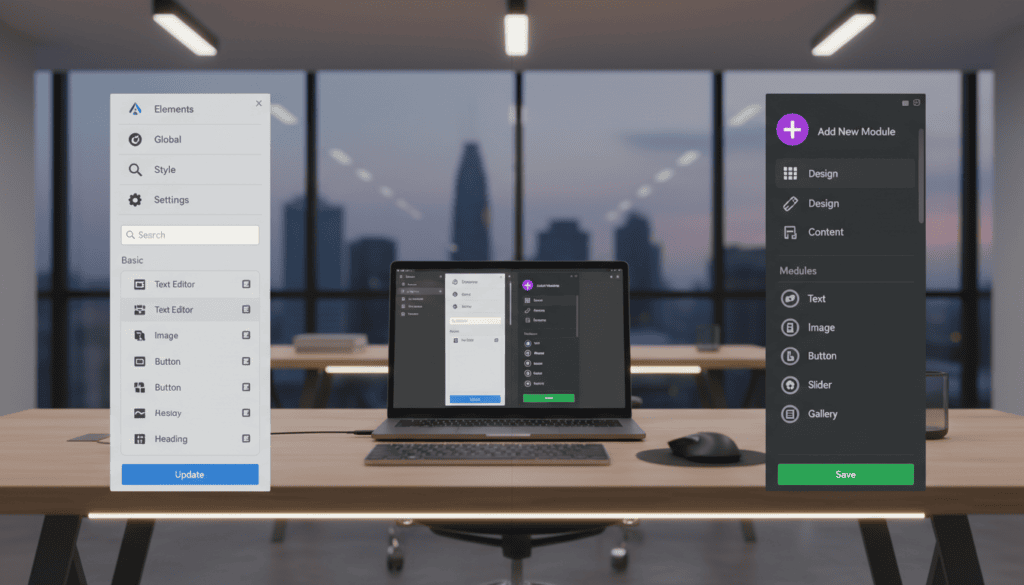
Fixed Sidebar vs Floating Panels
Two distinct philosophies govern the editor layout. One uses a fixed control sidebar. The other employs movable, floating panels.
This fundamental choice affects your creative flow. The fixed approach keeps tools consistently anchored. The floating system offers full-screen design freedom.
Critical responsive controls follow this pattern. Elementor places viewport icons at the top of its panel. Divi positions its device toolbar at the bottom.
- Top-positioned controls provide immediate, visible switching between desktop, tablet, and mobile views.
- Bottom toolbar access requires a slight workflow shift, but offers the same granular breakpoint adjustments.
- Both systems allow device-specific styling; the difference is primarily in immediate accessibility.
For users building many responsive pages, the top-mounted controls can feel more intuitive. The learning curve is often gentler for those new to visual builders.
Ultimately, your preference for a structured sidebar or a fluid canvas is subjective. Our testing confirms both approaches are competent.
Design Customization and Styling Options
Design consistency isn’t just about aesthetics; it’s a core component of user experience and brand trust. The right visual builder provides systems to manage this efficiently, not just individual styling options.
Global Styling Versus Presets
One platform centralizes control through a Global Site Settings panel. You define fonts, colors, and button styles once. These choices then apply site-wide, ensuring every page and widget aligns with your brand.
This design system includes Global Colors and Global Fonts. Change a primary color here, and it updates across hundreds of elements instantly. It’s ideal for maintaining strict brand consistency on a single website.
The alternative uses a Presets feature. You style a module—like a testimonial block—and save that look as a reusable preset. Apply it to similar modules anywhere on your site with one click.
This approach excels for agencies. They can create a library of client-specific layouts and template styles. It streamlines rebuilding common design patterns across multiple projects.
Both builders organize options in Content, Style, and Advanced tabs. This gives granular control over spacing, borders, and effects for each element.
The Pro version’s Theme Style feature effectively replaces theme code for global settings. For deep customization, both offer custom CSS integration. One adds it per element with a live preview. The other provides CSS before and after elements for more flexible positioning.
Building Elements: Widgets, Modules, and Add-ons
Your creative scope is defined by the raw materials in your toolkit: the elements, blocks, and extensions you can drag and drop.
Core Building Blocks
One builder offers a generous free version with 32 basic widgets. Its pro tier expands access to 68 total, covering advanced forms and dynamic content.
The alternative provides 68 modules upfront with no free tier. You get the complete set immediately.
Their structural philosophies also differ:
- One uses modern Flexbox Containers and Grids for flexible layout options.
- The other relies on a system of Sections, Rows, and pre-built columns.
The third-party ecosystems are massive. One has countless add-on plugins for specialized functions.
The other features a curated marketplace with over 250 extensions. All-in-one packs like Divi Supreme Pro add 50+ new modules and hundreds of layouts.
For sheer element count, the pro builder wins. For bundled value without tiered restrictions, the competitor’s 68 included modules offer strong economics. See our detailed feature comparison for a deeper analysis.
Theme Building and Template Library Deep Dive
A truly powerful page builder extends its reach beyond individual pages to define your entire site’s architecture.

Premade Layouts and Template Kits
Both platforms let you visually craft headers, footers, and archive pages. The difference is stark in execution.
One system uses Display Conditions for granular control. Its Loop Builder is a game-changer for dynamic content.
You design a single card with any widget. The platform then repeats it for every post in a query.
The alternative uses a Blog module for archives. It works well but offers less design flexibility for custom layouts.
For pre-built content, the libraries differ in scale and structure. The pro version provides over 300 templates and complete kits.
The competitor counters with 350+ layout packs. This includes over 2,500 individual page layouts.
You get immediate access to this vast collection. It’s ideal for importing entire website designs rapidly.
The choice is between sheer volume and specialized creative support. One excels at quick starts; the other empowers unique, complex layouts.
WooCommerce Integration and eCommerce Capabilities
The quality of your WooCommerce integration directly shapes customer experience and sales performance. Your builder must offer deep design control over product displays and the checkout flow.
Elementor Pro delivers over 24 dedicated widgets for store pages. You can design dynamic product grids and customize the cart visually. A key limitation exists: its powerful Global Styles don’t provide granular control over WooCommerce elements.
Divi offers a similar toolkit with 25 WooCommerce modules. These unlock automatically when you install the plugin. The Divi builder provides a distinct advantage for checkout design.
It splits the process into separate modules for billing, shipping, and payment. This allows for fine-tuned control over each conversion step. Both platforms let you build custom product pages and shop layouts.
Third-party extensions significantly expand these core features. For Elementor, add-ons like JetWooBuilder add 60+ specialized widgets. This fills functional gaps and provides extensive support for complex stores.
Your choice hinges on workflow. Divi offers more granular native control over the checkout sequence. Elementor boasts a stronger third-party ecosystem for advanced content and template needs. Both provide professional access to essential eCommerce features.
AI Integration for Creative Website Building
Artificial intelligence is no longer a futuristic concept; it’s a practical tool reshaping how we build websites today. Both leading platforms now integrate AI features, but their implementations and business models differ sharply.
AI Text Generation and Image Editing Tools
Elementor AI arrived in version 3.13. It works across text, images, and layouts. The Writing Assistant generates and edits content, even producing code snippets.
Its AI Site Planner creates wireframes for key page structures. This accelerates the initial planning phase. A critical limitation exists: it operates on a separate credit system.
Divi AI launched in version 4.22. It offers similar core capabilities. Text generation can match a defined brand voice. The system also creates and edits images on demand.
Its AI Quick Sites feature can generate complete website templates from a prompt. The key advantage is its pricing model. Unlimited usage is included for a single flat price.
For agencies building many client pages, Divi’s model offers superior economics. The first platform’s pay-per-credit approach may suit occasional users. Your choice hinges on projected AI content volume.
Pricing, Licensing, and Value Comparison
We break down the financial models behind these platforms to reveal which offers genuine return on investment. Your choice here impacts long-term project costs and scalability.
Free Version vs. Premium Plans
One platform uses a freemium plan. Its robust free version includes 32 basic widgets. You can build a complete website at zero cost.
This is perfect for testing or basic sites. The pro version starts at $84 per year for one site. It unlocks 86 advanced widgets.
Higher tiers cost $99/year for 3 websites, $204/year for 25, and $399/year for 1,000. Each plan grants full access to features and support.
The other requires upfront payment. Divi offers no free tier. Its annual plan is $89 per year.
This includes unlimited site licenses. You get the theme, builder, and extra plugins. The lifetime access option is a $249 one-time payment.
For a single site, the first pro plan has a lower entry cost. For agencies building multiple client websites, unlimited licensing provides superior value per site.
Calculate your specific use case. Five or more sites make the unlimited model the clear financial winner. Your design freedom and template access are tied directly to this investment.
User Reviews and Community Insights
Community sentiment and long-term user satisfaction offer a critical lens that pure performance data often misses. We analyzed thousands of reviews to understand real-world user experiences.
Elementor receives strong praise for its beginner-friendly interface. Users highlight the extensive widget library and massive third-party plugin ecosystem. Its free version provides exceptional value for learning.
Divi earns a 4.9/5 rating from its large user base. The lifetime licensing option and extensive template library are consistently praised. This offers a straightforward value proposition for many users.
Support quality is a frequent discussion point. Both platforms provide documentation and forums. Response times can vary by subscription tier, impacting user satisfaction.
Performance complaints are common. Some note high HTTP request counts with one builder. Others report editor lag on complex pages with the other, especially on budget hosting.
| Platform | Key User Praise | Common Complaints | Support Note |
|---|---|---|---|
| Elementor | Ease of use, plugin ecosystem | Steeper learning for advanced features | Varies by plan tier |
| Divi | Lifetime access, template library | Performance on complex content | Active community forums |
| Consensus | Both work for typical sites | Power users seek alternatives | Check support channels |
This comparison of community insights confirms our testing. There is no universal winner. Your choice depends on your specific needs and workflow preferences.
Conclusion
The evidence is clear: there is no single ‘best’ page builder, only the best builder for your specific set of requirements. Our comparison pits a freemium model with a massive third-party ecosystem against an all-in-one solution with unlimited licensing. Performance data confirms this trade-off: one excels on simple pages, while the other handles complex designs more gracefully.
Your strategic winner depends entirely on your project’s scope. Choose the first for its free entry point and extensive plugin support for single sites. The second, Divi, offers superior value for agencies through lifetime access and bundled AI features. Interface preference—fixed sidebar versus floating panels—remains a subjective choice.
Economically, single-site projects favor a lower annual cost. Building five or more client websites makes an unlimited license the clear value champion. For a deeper dive into the data behind this WordPress page builder comparison, review our detailed analysis. Invest based on your long-term needs, not short-term hype.
FAQ
Which builder is genuinely faster for my website?
Based on our performance tests, Elementor consistently delivers faster loading times. It produces cleaner, more efficient code, which translates to better Core Web Vitals scores and a superior user experience for your visitors.
Is the Divi Builder lifetime deal worth it?
The Divi lifetime plan can offer significant long-term value if you manage multiple client sites. However, weigh this against its heavier framework, which can impact site speed. For pure performance and modern development practices, Elementor’s annual model often provides better value per dollar.
How do their free versions compare for beginners?
Elementor’s free plugin is more powerful, offering a robust set of widgets and design controls that let you build complete sites. Divi requires the premium theme, so its free offering is essentially a trial. For starting out without investment, Elementor is the clear winner.
Which platform has better design flexibility and templates?
Divi excels with its vast library of premade layout packs for quick launches. Elementor focuses on a superior core editor and granular control. For intricate, custom designs where every pixel matters, we find Elementor’s styling system and global settings provide more professional precision.
Can I effectively build WooCommerce stores with both?
Yes, both have strong eCommerce capabilities. Elementor offers dedicated WooCommerce widgets in its Pro plan for designing product pages and archives. Divi includes specialized modules within its theme. For deep store customization and performance, Elementor’s integrated approach is often more streamlined.
How do their AI tools assist in the building process?
Both integrate AI for text and image generation. Elementor’s AI is built directly into its content panels for quick copywriting. Divi’s AI features help generate entire layout sections. Their usefulness depends on your workflow; they are productivity aids, not replacements for strategic design.
Which community offers better support and resources?
Elementor has a larger, more active global community and a wealth of third-party add-ons. Divi’s community is very dedicated, with extensive user-made templates. For finding solutions and hiring developers, Elementor’s ecosystem is generally broader and more accessible.